How to Batch Remove Existing Headers and Footers from PDF Offline
Published on: June 9, 2026 | Category: Data Security
When handling corporate archives, legal discoveries, or proprietary clinical trials, de-identification and desensitization are paramount. Often, documents contain outdated confidential headers, redundant watermarks, or old page numbers in their margins. Sharing these files safely requires a secure way to batch remove page numbers and headers from PDFs offline.
Step-by-Step Guide to Batch Remove Headers and Footers Securely Offline
Old watermarks, confidential stamps from previous revisions, or distracting page decorations cluttering up your PDF documents? Removing headers and footers one page at a time in Acrobat is slow and tedious. This guide shows you how to batch-strip headers and footers from entire PDFs in seconds, entirely on your local machine.
Follow these 3 simple steps to complete your task in seconds:
- Download & Launch PDF Agile: Get the lightweight PDF Agile client. Open your target document securely inside the desktop software offline.
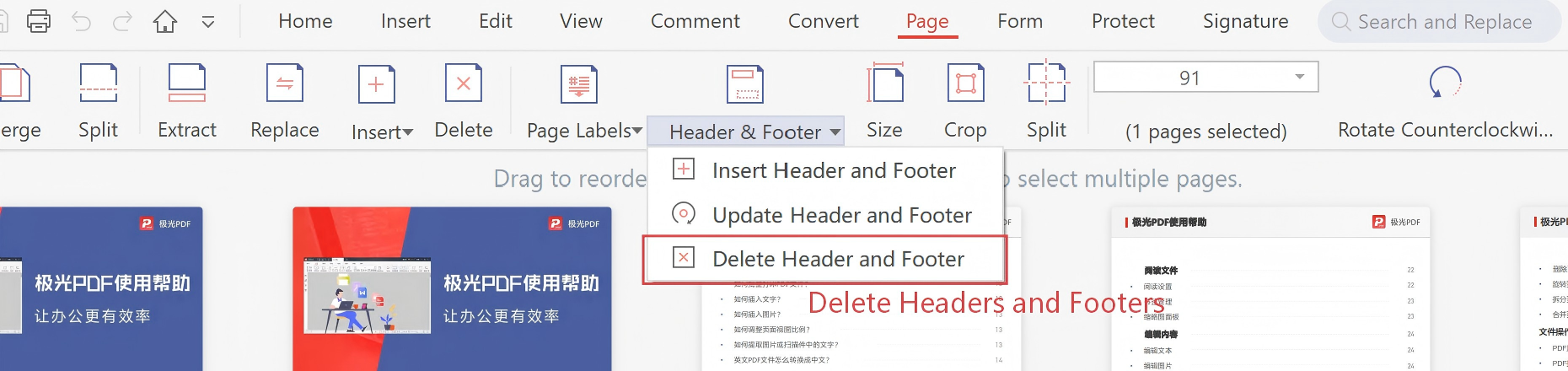
- Access the Deletion Tool: Go to the Page Numbers toolbar and click on the Delete Headers & Footers / Page Numbers option.
- Erase and Save: The software will automatically analyze document geometry and purge existing header/footer text layers cleanly from all pages. Save your desensitized file.
Pro Tip: Unlike simple white-box overlay tools that only hide the metadata, PDF Agile permanently purges the binary text layers of headers and footers from the file structure, ensuring total compliance.
Need Safe Local PDF Formatting?
Download PDF Agile to batch-paginate, crop margins, insert headers/footers, and split dual-column pages with 100% offline security.
Download PDF Agile for Windows