How to Format Page Numbers as Page X of Y in PDF
Published on: June 9, 2026 | Category: Formatting & Layouts
Formatting page numbers as 'Page X of Y' (e.g., Page 1 of 50) is highly recommended for professional proposals, legal documents, and contracts. It immediately informs the recipient of the total length of the file, helping detect missing pages instantly.
Step-by-Step Guide to Format Page Numbers as Page X of Y Securely Offline
Sometimes plain Arabic numerals do not cut it. Professional reports, legal contracts, and pitch decks often require page numbering in the format "Page X of Y" to give readers a clear sense of document length and progress. Learn how to apply this format, along with Roman numerals for front matter, using a lightweight desktop editor.
Follow these 3 simple steps to complete your task in seconds:
- Download & Open PDF Agile: Launch the offline desktop suite PDF Agile and import your document.
- Add Page Numbers: Go to the top toolbar and choose Add Page Numbers.
- Select 'Page X of Y' Template: In the number format dropdown box, directly select the Page X of Y style. Adjust size and placement, and click Apply to insert numbers cleanly.
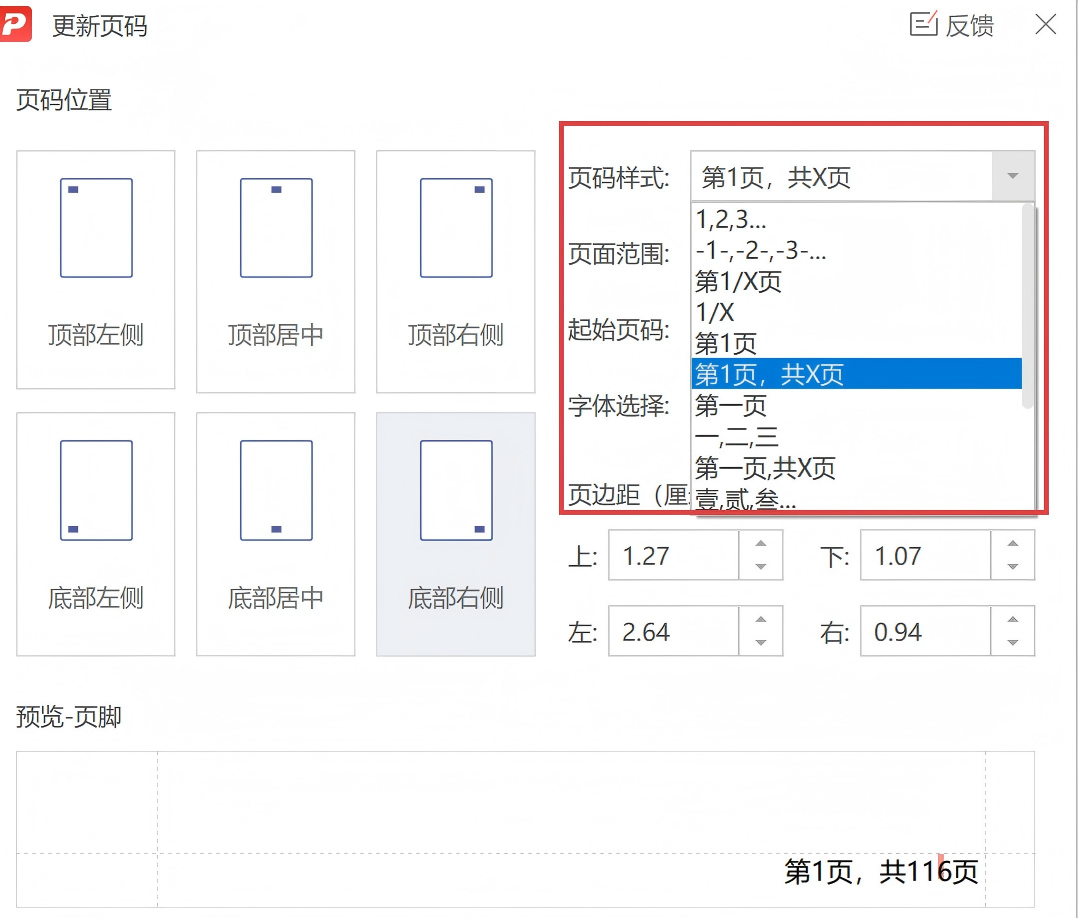
Pro Tip: PDF Agile automatically scans document parameters to dynamically calculate the total count Y, so if you append or delete pages later, you can update the pagination instantly.
Need Safe Local PDF Formatting?
Download PDF Agile to batch-paginate, crop margins, insert headers/footers, and split dual-column pages with 100% offline security.
Download PDF Agile for Windows